
TNREGINET | EC View, Guideline Value, Encumbrance Certificate
TNREGINET (Tamil Nadu Registration Department’s official portal) is a one-stop digital platform that simplifies property-related services for citizens. Through this portal, users can easily check the Encumbrance Certificate (EC) online, verify guideline values of properties, and download official certificates without visiting a sub-registrar office.

The TNREGINET English portal enhances transparency, minimizes manual paperwork, and ensures fast access to vital property records, making it a valuable platform for property buyers, sellers, and legal experts in Tamil Nadu.
TNREGINET Portal Registration
To access all services like downloading a certified EC, applying for registration, or using calculators, you need to create an account.. Here’s how:
Step 1: Visit the Official Website
- Open https://tnreginet. gov. in in your browser.
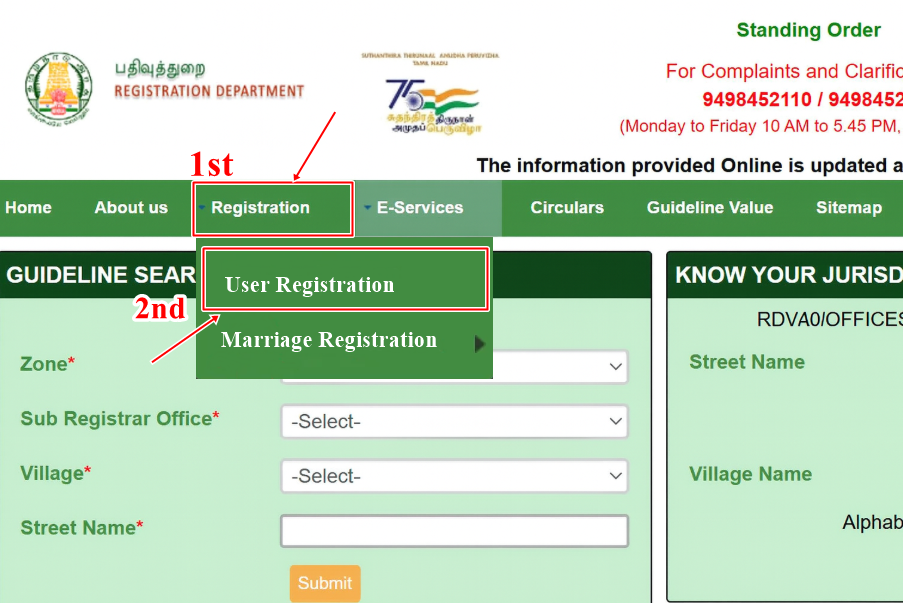
Step 2: Click on “User Registration”
- On the homepage, go to the “Registration” option.
- Select “User Registration” from the drop-down.
Step 3: Fill in User Details
You’ll see a registration form. Fill in the following details:
- User Type: Citizen / Organization / Government.
- Username: Choose a unique username.
- Password & Confirm Password: Set a secure password.
- Security Question: Select and answer for password recovery.
- Personal Information: Name, gender, DOB, email ID, mobile number.
- Address Details: Full residential address.
Step 4: Verify Mobile Number & Email
- You will receive an OTP on your registered mobile number/email.
- Enter the OTP to verify.
Step 5: Submit & Activate Account
- Click Submit after filling in all details.
- Your account will be activated, and you can log in with your username and password.
Pro Tip: Always use your active email ID and mobile number, as you will receive updates, acknowledgments, and official communication there.
What is TNREGINET?
Tamil Nadu Registration Department Portal is an official online service launched by the Tamil Nadu government to digitize property-related services. Instead of visiting the Sub-Registrar’s office multiple times, you can access property details online.
The portal covers:
- Encumbrance Certificate
- Guideline Value search
- Marriage, birth, and death registrations
- Stamp duty and registration fee calculators
For property buyers and investors, the TN EC view online and guideline value services are the most important.
What is an Encumbrance Certificate (EC)?
An Encumbrance Certificate (EC) is an official document issued by the land or property registration department that shows the legal ownership and transaction history of a property. It confirms that the property is free from any monetary or legal liabilities, such as loans or mortgages. The EC is essential when buying or selling property to ensure a clear title.
How to View EC Online?
Follow these steps to check EC details online:
Step 1: Visit the Official Website
- Go to tnreginet gov in

Step 3: Choose “TN View EC”
Click on the “View EC” option. This will open a new page for searching your property’s EC.
Step 4: Search by Document or Property Details
You can search for the EC using one of the following methods:
| Search Type | Required Details |
|---|---|
| EC Search by Document Number | Enter Sub-Registrar Office (SRO) name, document number, and year. |
| EC Search by Property Details | Enter zone, district, village, survey number, and sub-division number. |
| EC Search by Flat/Plot Details | Enter plot number, door number, and street name. |
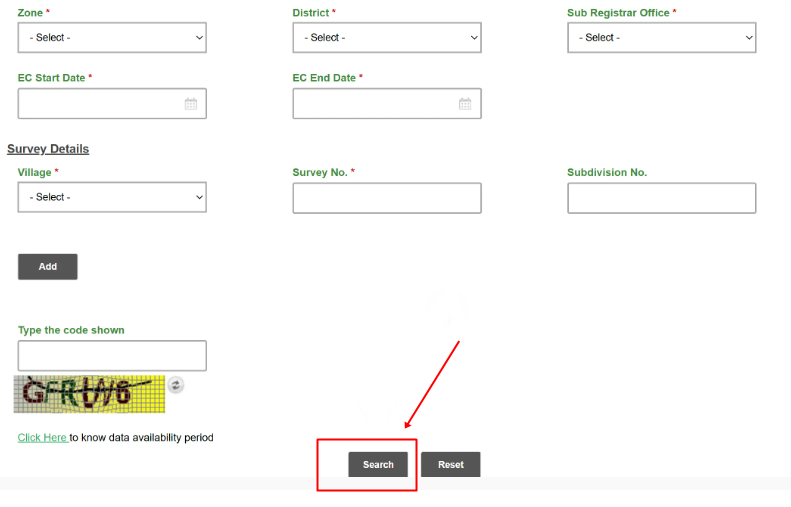
Step 5: Enter Captcha and Submit
Fill in the captcha code displayed and click on “Search.”
Step 6: View EC Results
The search result will show a summary of the Encumbrance Certificate, including transaction history and ownership details.
Step 7: Download and Print EC
Click on “View Document” to open the full Encumbrance Certificate in PDF format.
You can download or print the EC for official use.
Why is EC Important?
- Proof of Ownership – Confirms the rightful owner of the property.
- Loan Approval – Banks require EC before granting home loans.
- Prevents Fraud – Ensures property is free from legal disputes or debts.
- Property Transfer – Essential during sale or inheritance of property.
Example: If you plan to buy a plot in Chennai, an EC will show whether the seller has a clear title or if the property is already mortgaged to a bank.
Charges for Encumbrance Certificate in Tamil Nadu
| Service Type | Fees (Approx.) |
|---|---|
| EC for 1 year (online view) | Free |
| Certified Copy of EC (per year of search) | ₹15 |
| Application Fee | ₹5 |
| Additional Search Fee (per year) | ₹15 |
(Note: Fees may vary as per government notifications. Always check tnregient for updated charges.)
Understanding Your Encumbrance Certificate Report
When you open your downloaded Encumbrance Certificate, you’ll see a table format showing property transactions. Here’s how to read it:
| Column | Meaning |
|---|---|
| Document No. & Year | Refers to registration details of a sale, mortgage, or lease. |
| Nature of Transaction | Type of transaction — sale, gift, release, or mortgage. |
| Name of Parties | Buyer (purchaser) and seller (vendor) details. |
| Property Details | Survey number, extent, and location. |
| Remarks | Additional notes or clarifications. |
Example:
If you see “No encumbrance found for the period,” it means your property is free from legal liabilities during the selected date range.
How to Check TNREGINET Guideline Value?
The Guideline Value is the minimum value fixed by the Tamil Nadu government for property transactions in a particular area. It helps prevent under-reporting of property values and ensures proper stamp duty collection.
The tnreginet வழிகாட்டி மதிப்பு is essential when buying or selling property because it determines the minimum value for registration and the amount of stamp duty payable.
Step 1: Visit Online Portal
- Go to https://tnreginet.gov.in
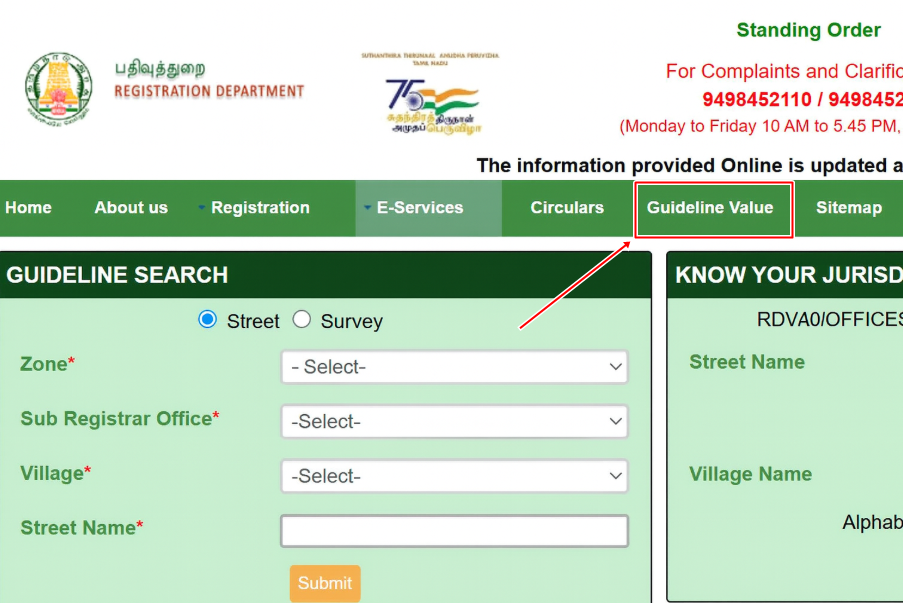
Step 2: Navigate to Guideline Search
- On the homepage, click on “E-Services → Guideline Search.”
Step 3: Choose Search Method
You can search by:
- Street Name – Enter the street name, zone, sub-registrar office, and district.
- Survey Number – Enter the survey number, village, and district.
Step 4: Enter Captcha & Search
- Fill in the required details and enter the security captcha.
- Click Search to view results.
Step 5: View Results
- The guideline value per sq. ft./sq. m. will be displayed.
- You will also see the property classification (residential/commercial).

Example: If the survey number in Coimbatore shows a guideline value of ₹2,000 per sq. ft., this is the minimum registration value, even if the seller quotes less.
Why Guideline Value Matters
- For Buyers – Helps you know the fair market value before purchasing.
- For Sellers – Ensures you don’t undersell your property.
- For Taxation – Used to calculate stamp duty and registration charges.
Example: If the guideline value of a land in Coimbatore is ₹2,000 per sq. ft., you cannot legally register it below that price, even if the seller agrees to sell at ₹1,800 per sq. ft.
Marriage, Birth, and Death Registration
The portal also allows citizens to apply for and verify personal documents online, reducing the need for physical visits.
Step 1: Go to Homepage
- Visit https://tnreginet.gov.in
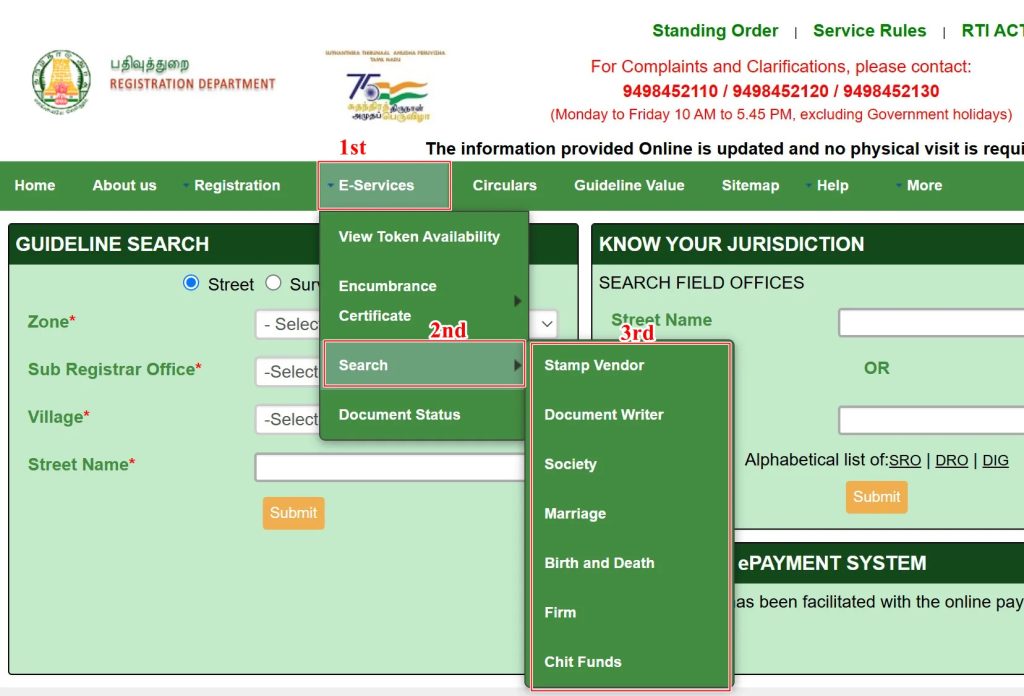
Step 2: Navigate to Registration Services
- From the menu, select “E-Services → Registration.”
Step 3: Choose the Required Service
- Marriage Registration – Apply for new marriage registration, check status, or download the certificate.
- Birth Registration – Register newborn details and download birth certificates.
- Death Registration – Register details of deceased persons and get certificates for legal or pension-related purposes.
Step 4: Fill in Details
- For marriage, enter bride and groom details, date, and place of marriage.
- For birth, enter child’s name, DOB, parents’ details, and hospital information.
- For death, provide name, date of death, place, and family details.
Step 5: Submit and Track Status
- Submit the application online.
- Use your application/reference number to track status on the portal.
- Once approved, you can download the certificate in PDF format.
Example: A couple married in Chennai can apply online for marriage registration, upload documents, and later download the digital marriage certificate, avoiding multiple visits to the registrar.
Stamp Duty & Registration Fee Calculator
Before registering a property, it’s crucial to know the exact stamp duty and registration charges you’ll need to pay.
Step 1: Visit Official Website
- Go to https://tnreginet.gov.in
Step 2: Select Fee Calculator
- On the homepage, click on “E-Services → Calculators → Duty and Fee Calculator.”
Step 3: Enter Property Details
- Choose the type of property (land, flat, independent house, commercial).
- Enter the property location (district, village, SRO).
- Provide the market value or guideline value of the property.
Step 4: Calculate
- Click Calculate to get an instant estimate.
Step 5: View Stamp Duty & Registration Charges
- The tool will show:
- Stamp Duty (usually 7% in Tamil Nadu for property purchases).
- Registration Fee (1% of the property value).
- Any additional surcharges or fees if applicable.
Example: For a flat worth ₹50 lakhs in Chennai:
- Stamp Duty = ₹3,50,000 (7% of value).
- Registration Fee = ₹50,000 (1% of value).
- Total = ₹4,00,000 approx.
This way, you can plan your budget before property registration.
Benefits You Need to Know
- Time-Saving: No need to stand in queues at the Sub-Registrar’s office.
- Transparency: Direct access to government records.
- Accuracy: Latest updates on transactions and guideline values.
- Legal Security: Avoids fraud and ensures hassle-free registration.
Common Issues & Solutions
- Website not loading → Try during non-peak hours or clear browser cache.
- Incorrect property details → Double-check survey number/sub-registrar office.
- EC not found → Some old records may not be digitized; visit Sub-Registrar office.
- Payment failed → Retry with another payment method or bank.
Helpline & Support
If you face issues while using the portal, you can contact:
Helpline Number: 044-24642774
Email Support: [email protected]
Timings: Monday to Saturday (10 AM – 5 PM).
Frequently Asked Questions
How can I get Encumbrance Certificate (EC) online in Tamil Nadu?
You can view EC free on TNREGINET portal by searching with document number or property details. For an official copy, complete the online application, make the payment, and download it through your tnreginet login.
Is EC available for all properties in Tamil Nadu?
Most properties are available, but very old records may still require a visit to the Sub-Registrar office.
How long does it take to get EC online?
Instant for viewing online EC. For a certified copy, it may take 2–3 working days after application and payment.
Can I check TN guideline value without visiting the office?
Yes, the Guideline Value search tool on TNREGINET allows you to check values online by survey number or street name.
What is the difference between Guideline Value and Market Value?
Guideline Value – Minimum value fixed by the government for registration.
Market Value – Actual price at which buyers and sellers agree.
The TNREGINET portal has made property verification in Tamil Nadu much easier. Whether you are checking ec view, calculating guideline value, or downloading an encumbrance certificate, you can now do it all online without middlemen.
If you’re planning to buy property, make it a habit to:
- Check the guideline value.
- Download the EC for the last 30 years.
- Verify ownership before making payments.
This small step can save you from legal disputes and financial losses in the future.